
As teams grow, work tends to spread out. Tasks live in documents, chats, emails, and meeting notes. Ownership becomes unclear, follow-ups slip, and progress is often tracked through status meetings rather than shared systems. This is usually the point where basic task lists stop being enough. Asana was built to solve exactly this problem: making work visible, owned, and trackable across teams without slowing execution down.
Rather than positioning itself as a simple to-do app, Asana focuses on work management — helping teams coordinate complex projects, dependencies, and responsibilities at scale.
What Is Asana — and Who Is It For?
Asana is a work management platform designed to help teams plan, track, and execute work across projects and departments. It sits somewhere between lightweight task tools like Trello and more specialized systems like Jira.
Asana is best suited for:
- Growing teams that need structure without rigid processes
- Managers who want visibility without micromanagement
- Cross-functional teams working on shared initiatives
- Organizations where ownership and follow-through matter
It is less ideal for:
- Very small teams with simple task needs
- Solo users looking for a personal to-do list
- Engineering teams needing deep sprint and backlog tooling
The key distinction is intent. Asana is not about managing individual productivity — it’s about managing shared work.
How Asana Works in Practice
Projects, Tasks, and Ownership
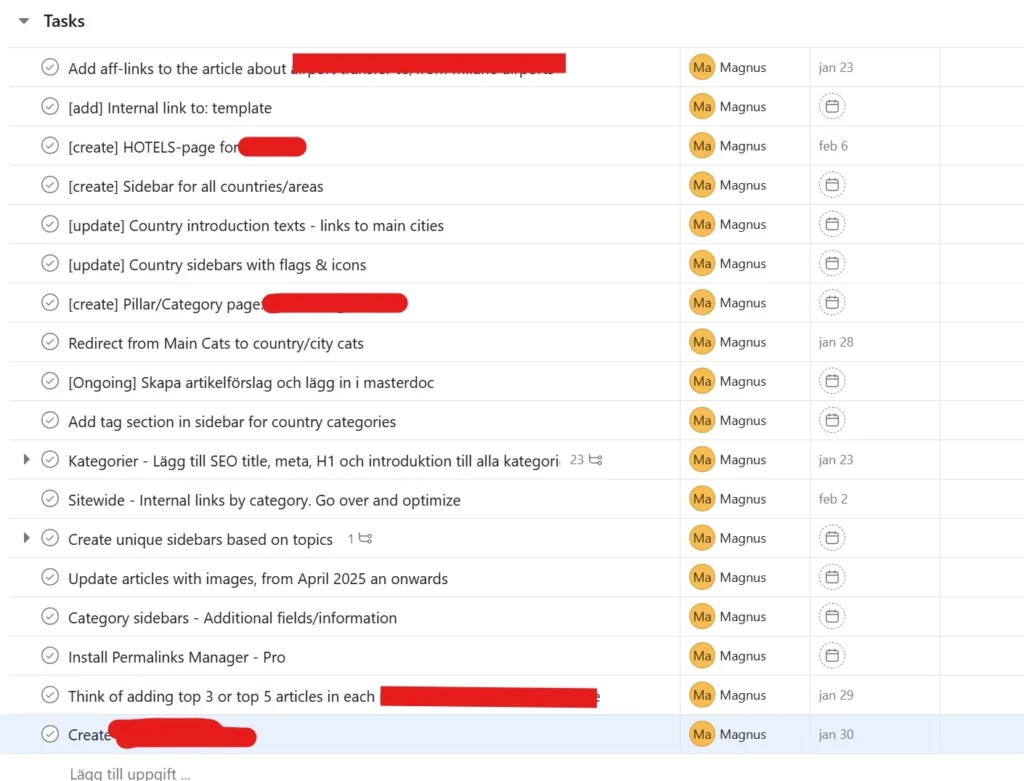
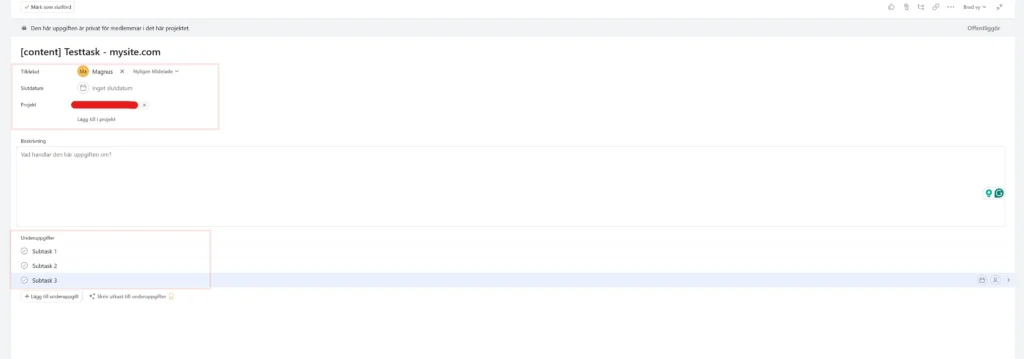
At its core, Asana is built around projects that contain tasks. Each task has a clear owner, due date, and status. This sounds basic, but the emphasis on ownership is intentional. If a task has no owner, it is effectively invisible.
Subtasks and dependencies allow teams to break work down without losing structure. Dependencies, in particular, help clarify sequencing — what must be completed before something else can begin. This reduces ambiguity and prevents work from stalling due to hidden blockers.
The result is a system where responsibility is explicit rather than assumed.
Multiple Views for Different Roles
Asana allows the same work to be viewed in different ways:
- List view for structured planning and prioritization
- Board view for workflow-based execution
- Timeline view for planning dependencies and deadlines
- Calendar view for time-based coordination
Different roles can work in the same project without forcing a single workflow style. Managers may prefer timelines, while individual contributors focus on boards or lists. The underlying data stays consistent, which reduces duplication and misalignment.
Asana as a System for Execution
Structure Without Micromanagement
One of Asana’s strongest qualities is how it replaces status meetings with shared visibility. Instead of asking for updates, managers can see progress directly in the system. Tasks move forward, blockers are visible, and priorities are clear.
This creates a balance where teams have autonomy, but work does not disappear into private task lists. Structure exists, but it supports execution rather than controlling it.
Tracking Progress and Outcomes
Asana includes built-in progress tracking at both project and portfolio levels. Milestones help teams align around key delivery points, while progress indicators show whether work is on track or at risk.
For leadership and team leads, this provides a way to track outcomes rather than activity. The focus shifts from “what are people doing?” to “what is actually moving forward?”
Automation and Integrations
Asana supports rule-based automation that reduces manual coordination. Common examples include:
- Automatically assigning tasks when status changes
- Moving tasks between sections based on progress
- Setting due dates relative to project milestones
Integrations with tools like Slack, Google Workspace, and CRM systems help Asana function as a central layer rather than another isolated platform. Used well, this reduces context switching and keeps work connected to outcomes.
Strengths and Limitations of Asana
Strengths
- Scales well as teams and projects grow
- Strong ownership and accountability model
- Flexible enough for multiple workflows
- Clear visibility without heavy process overhead
Limitations
- Requires onboarding and consistent usage
- Can feel complex for small or simple teams
- Not optimized for deep engineering workflows
Asana works best when teams are willing to invest some time upfront in structure. Without that, its flexibility can turn into noise rather than clarity.
When Asana Is the Right Choice — and When It’s Not
Asana is a strong choice when:
- Work spans multiple people or teams
- Deadlines and dependencies matter
- Visibility and accountability are recurring challenges
It may not be the best fit when:
- Work is highly linear and simple
- Teams want minimal setup
- Specialized development tooling is required
Compared to Trello, Asana offers more structure and reporting. Compared to ClickUp or Monday, it tends to be more opinionated around ownership and execution, which some teams prefer and others resist.
Comparing Asana with Other Work Management Tools
When evaluating Asana, it helps to see how it stacks up against similar platforms. Here’s a practical look at three common alternatives:
| Feature / Tool | Asana | ClickUp | Monday.com | Trello |
|---|---|---|---|---|
| Best For | Growing teams needing structure and visibility | Teams needing high customization and automation | Teams preferring visual workflows | Small teams or simple projects |
| Project Views | List, Board, Timeline, Calendar | List, Board, Gantt, Calendar, Mind Map | Board, Timeline, Calendar | Board, Calendar (with Power-Ups) |
| Task Ownership | Strong, clear assignees & dependencies | Flexible, supports complex hierarchies | Moderate, depends on setup | Basic, mostly boards & cards |
| Automation | Rules for recurring tasks, notifications | Highly customizable automations | Basic rules & automations | Limited (Power-Ups required) |
| Reporting / Tracking | Progress tracking, milestones, dashboards | Advanced dashboards, reporting, goals | Dashboards and status tracking | Minimal, mostly manual |
| Learning Curve | Moderate | Steep | Moderate | Very low |
| Scalability | Medium to large teams | Medium to large teams | Medium teams | Small teams |
| Pricing Considerations | Free & paid tiers, grows with users/features | Free & paid tiers, can get complex | Paid tiers scale with users/features | Free & paid tiers, simple pricing |
ClickUp
ClickUp is a highly flexible, all-in-one work management tool. It covers tasks, documents, goals, time tracking, and reporting. For teams that need a lot of customization, ClickUp can be very powerful.
Pros:
- All-in-one platform for tasks, docs, and goals
- Strong automation and reporting capabilities
- Scales well for larger or complex teams
Cons:
- Steeper learning curve
- Can feel overwhelming for smaller teams
- High flexibility can lead to inconsistent usage if not structured
Best for: Teams that want a highly customizable platform and don’t mind investing time in setup.
Monday.com
Monday.com is a visual, board-based work management tool. It emphasizes clarity and progress tracking through dashboards and timelines, making it easy to see work at a glance.
Pros:
- Visual and intuitive interface
- Simple status tracking and reporting
- Easy to onboard new users
Cons:
- Some advanced workflows can be limited
- Pricing can increase quickly as teams scale
Best for: Teams that prefer visual workflows and want an easy-to-understand overview of work without heavy configuration.
Trello
Trello is a lightweight Kanban board tool that works well for small teams or simpler projects. It’s easy to use but lacks the structured workflow and reporting features of Asana.
Pros:
- Extremely simple and fast to get started
- Intuitive Kanban-style boards
- Free tier works well for small teams
Cons:
- Limited reporting and analytics
- Not ideal for complex projects or larger teams
- Fewer automation and integration options than Asana
Best for: Small teams or individuals who want a simple, visual task board and are not yet ready for full work management software.
How to Choose
- Choose Asana if your team needs structure, ownership, and visibility across complex projects.
- Consider ClickUp if you want maximum flexibility and don’t mind investing in setup.
- Choose Monday.com if your team prefers a visual approach with easy onboarding.
- Stick with Trello for smaller teams or very simple workflows.
Final Thoughts: Is Asana Right for Your Team?
Asana is not about doing more work — it’s about making work clearer. For teams struggling with coordination, follow-up, and visibility, it provides a solid framework for execution without forcing rigid processes.
If your team is outgrowing basic task tools but isn’t ready for heavy project management systems, Asana often sits in a practical middle ground. The value comes not from its features, but from how consistently it enforces clarity around who owns what — and when it needs to be done.
Next step for you: Evaluate Asana alongside other work management tools and test it with a real project before committing.
Need help getting started? If you’d like a walkthrough of Asana or some personalized guidance for your team, feel free to contact me directly — I can help you set it up and make sure it fits your workflow.
Reach me by Linkedin, email or phone
Frequently Asked Questions About Asana
Asana is a work management tool that helps teams plan, organize, and track projects and tasks. It provides visibility into who is responsible for what, when tasks are due, and how work progresses across teams.
Asana works best for growing teams that need structure, accountability, and visibility across multiple projects. It is less suited for very small teams or individuals with simple task needs.
Yes, Asana offers a free tier with basic task and project management features. Paid tiers add advanced capabilities like timelines, rules for automation, reporting dashboards, and team-wide permissions.
The learning curve is moderate. Most teams can start managing simple projects quickly, but advanced features like dependencies, rules, and reporting may require some onboarding or training.
Yes, Asana integrates with Slack, Google Workspace, Microsoft Teams, CRM systems, and many other tools. This allows teams to centralize work without losing connectivity between different platforms.